

Ever notice the simpler things get the more complicated it becomes. Recently I have helped three different flyers with radio problems.
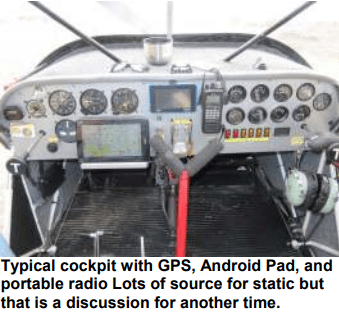
One of the things I learned in the service industry, people seldom know what the problem is. One friend complained about unbearable static in his radio since it was installed. He flew his plane back from southern Ontario after purchasing it and when his radio failed in Thunder Bay he had a new one installed by a qualified avionics shop. The shop told him that the mic sensitivity had to be lowered but they did not have the service manual to know which “jumper” had to be adjusted. Being me I decided to dig in and see if I could help.
First a ride in the plane and it was clear that the static he was complaining about was the intercom function on the radio going live. The intercom on his radio has mic sensitivity settings available on the start-up screen, by pressing certain buttons while turning the radio on. Checking the setting I found it set to mid and adjusted it to low. This means the sensitivity of the mic is lower, so the intercom channel does not open as easily. The new setting made his static miraculously disappear. It was not static but rather the opening of the vox circuit for the intercom that was filling his headset with noise.
Which brings me to the most important point in this discussion. When you have an issue try to be sure what the issue really is. If you tell the technician working on a problem that the static is unbearable, he may start chasing ways to improve reception including chokes, filters, better ground planes for the antenna, etc. and never really get to the issue you have which may be a vox setting that is too sensitive. Try to isolate what your problem really is before you ask for help in getting something fixed.
Another flyer had the same complaint with a similar radio and of course this was now an easy fix. Experience is a great teacher. Still another flyer had radio issues so severe he stayed away from the Red Deer area for fear of not being heard and not be able to hear the tower transmissions. Going through the settings from start to finish quickly gave him a great functioning radio that allowed him the peace of mind to fly most anywhere.
I personally had a problem with my radio in the Buzzard when I first got the plane. I could not transmit much more than about 3 to 5 miles, to my flying friends, using a handheld with an external antenna. The tower at Red Deer always heard me so I did not think much of it. I thought maybe my radio was bad so I picked up a new icom handheld and it got worse. I started checking the antenna and discovered that the one that came with the plane was a UHF tuned antenna rather than a VHF antenna. A friend had a ELT 121.5 antenna laying around and offered it to me. I switched out antennas and can now transmit 25 to 30miles and receive 50 to 80 miles. Good enough for the flying I do.
So, remember you may be able to get that radio working better. Just make sure you know what the real issue is before you try to fix it Best hint for better radio transmissions. Put the microphone as close to your lips as you can and talk in a normal voice. Yelling into the mic will tend to distort your transmissions, and having the microphone not touching your mouth will encourage picking up cabin noise.
Norm V
 Calgary Recreational Flying Club YYC