

Boy, its cold!!!
I think this has to be one of the worst winters on record. Chinooks have been as rare as hen’s teeth and I swear that some of the snow that fell in November is still on the front lawn!
However, the cold has not prevented me from getting in some flying. I think I’ve broken some personal records for cold flights though. One afternoon I was out in -24° C. In the air, it was a balmy -30° C. The heater was keeping the cabin around -5° C which gave me an endurance of about 90 minutes before the toes started to become numb. I was quite impressed with the performance with density altitudes below sea level.
Fortunately, the long-range forecast is promising more seasonal temperatures later this week. This is just in time as the Circuit Café in Penhold plans to be open every Saturday from 9 AM to 4 PM starting March 12th. One thing I’ve noticed over the years is that pilots love gadgets for their planes. We are always looking for the electronic wizardry to make our flying experience safer, more economical and/or more convenient. The latest toy du jour has the be the locating beacon; whether it be SpiderTrax, SPOT, APRS, 121.5 ELT or 406 ELT, all have their supporters and detractors.
However, the all-time favorite pilot trinket has to be the GPS. Whether you favour the basic functionality of the $99 Wal-Mart special or need the all-out complexity of a Garmin 530 coupled with an EFIS display, very few pilots have held off from using a GPS in the cockpit. Even hold-outs like Stu Simpson have broken down and now use a dedicated Aviation GPS.
Personally, I’ve grown to rely on my GPS for most navigation needs. The increase in safety is exponential over dead reckoning. (How safe can something called “dead-reckoning” be?) In addition to the obvious safety benefits of giving your exact position at all times and the nearest airport in the event of emergency; GPS navigation reduces the likelihood or running out of fuel and allows the pilot to spend more time with their heads outside the cockpit watching for other traffic. Finally, it’s boosted the confidence of pilots to try trips that they otherwise wouldn’t.
But what happens when the screen goes black or that dreaded “no satellite found” message pops up? Obviously, having a paper map readily available is key. When I’m just flying locally in familiar territory, the map availability is having it folded up stored in easy reach. On longer trips into unfamiliar territory, the track line is etched on the map and it’s open to the right map segment on my lap.
In the past, I’ve always had a second aviation GPS set up for the longer trips. I used to keep a cheap Garmin GPSMAP 96 in the Cessna 150 that I’d hook up in the Christavia when tracks led more than a couple hundred miles from home. Unfortunately, the GPS left with the 150 so I was without backup. After last year’s trip to Portland, I became astounded by the practicality of my iPhone. I was using it as a flight planning tool, a weather radar system, in-flight entertainment (no, I didn’t watch movies, but it was great for music), e-mail and, of course, it’s also a phone . However, one function I did not explore was the use of the built-in GPS.
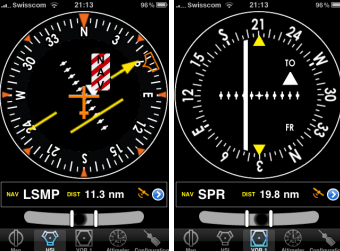
With the upcoming trip to Oshkosh, I’ve decided to see what options are available to use the iPhone as an aviation GPS. A quick search led me to Air Navigation by Xample Sarl. This application comes in three flavours. The first level is the Free version. With this you get a database of over 30,000 airports and waypoints worldwide (and yes, it includes Bishell’s and Kirkby’s fields) and three instrument views, an HSI, a VOR CDI and an ADF needle. There is also a groundspeed indicator in a separate screen. Finally, a ball slip indicator is provided in all screens. There is no moving map in the free version.
The next level up is Air Navigation Standard for a whopping $10.99 and brings in a moving map display to the picture with airspace information. However, the moving map does not display full geographical information, simply airspace and waypoint information. In addition, a waypoint editor is included to add your own waypoints to the database. Finally, altitude is added along with a logbook function.
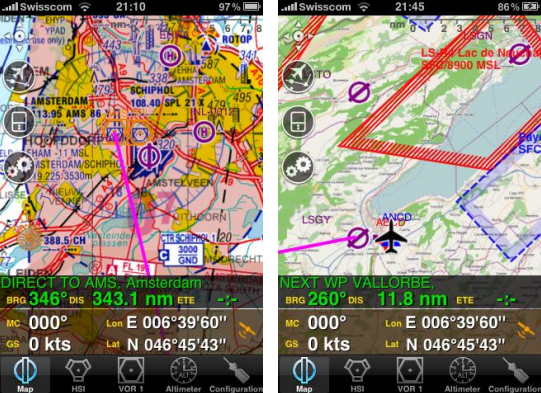
At the top level is Air Navigation Pro. At $37.99, it’s one of the pricier iPhone apps available, but it provides full functionality to the GPS, most importantly: terrain information and the ability to load in sectional charts (unfortunately, US sectionals only). In addition, there are other features such as a flight recorder that can display your flight on Google Earth. Although Canadian VNC maps are not available online for the application, base maps from http://www.openstreetmap.org can be loaded into the application to give you roads, towns, and other geographical features for free. Worldwide terrain data is available for free as well.
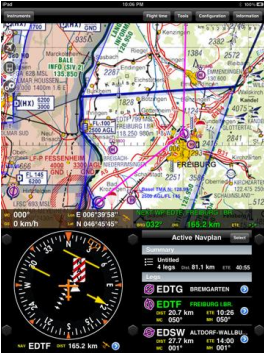
Currently, the Air Navigation products can be used with the Apple iPhone 3 and 4 series and the iPad with no additional hardware. It can also be used with the iPod Touch, but an external GPS receiver, such as the Magellan Premium Car Kit (retails for about $130) or Magellan ToughCase ($179), would need to be added. Also, since there is no 3G wireless internet with the iPod Touch, maps would need to be downloaded from a computer or over a Wi-Fi connection. The iPad would provide a stunning navigation platform, as long as you have a place to put the large screen. See the screen shot at the bottom of this page.
Now, there are a few words of warning here. First, the GPS in the iPhone does not allow for an external antenna, which may limit reception in some aircraft. You’ll probably find that it’s not as reliable or accurate as a dedicated GPS. Second, in the US it’s illegal to use cell phones in flight including the 3G data network. If you use “Airplane Mode” it will disable your GPS as well as the cell transceiver. However, you can turn off 3G usage under settings that should make you legal and still leave the GPS active.
If you already have an iPhone, iPad or iPod Touch, these applications may make a great addition to your pilot’s toolbox. As a simple backup to your existing GPS, the Free product is fine. If you want a basic, primary navigation product to keep you clear of Mode C airspace and to use in conjunction with paper maps, the Standard will probably due. However, the best bang for the buck in aviation GPS’s seems to be the Pro version. It makes a great backup and would be very effective as a primary navigation and flight planning tool… especially with the iPad.
As you may have guessed, I choose to go with the Air Navigation Pro product. Fortunately, I have space on the left side of the panel to add a mount for the iPhone using a RAM mount. With power available through an accessory plug and audio available to the Garmin GMA 240 audio panel, the iPhone will become an integral part of the airplane
 Calgary Recreational Flying Club YYC