

There’s no shortage of competition these days for your GPS dollars. If you’re thinking of getting a new one, I strongly urge you to look at the Anywhere Map ATC (Anywhere Travel Companion). This touchscreen GPS is full of useful features at an excellent price. The ATC, and its close rival from Bendix King, seem to have thrown a real gauntlet at the feet of industry leader Garmin. So much so, in fact, that Garmin has come out with its own line of similarly styled touch screen, multi-mode units.

One of the biggest draws for me is the ATC’s portability. It fits easily into a shirt or pants pocket, just like a wallet might. Despite its seemingly small size, it has a bigger screen than most of the other handheld aviation GPSs out there. Its screen is 4.3″ diagonal, which Garmin now matches with their new Aera line. But the ATC also has a much higher screen resolution at 800 x 480 versus Bendix King’s AV8OR and Garmin’s Aera, both at 480 x 272.
I had the opportunity to try out a Garmin 296 to test its size, screen resolution and other features. It couldn’t come close to the ATC in anything but aviation mapping. That’s to say that at the time, it had better aviation maps for Canada. Anywhere map updated its Canadian aviation database last summer and it’s easily the equivalent or better than Garmin’s.
And the 2/3/496 series is bulky, like carrying a small brick compared to the ATC.

Despite having these immediate advantages, the ATC, at $595 US, is still about $150 cheaper than the AV8OR and $250 cheaper than the Aera. A pretty good bargain if you ask me.
But how does it fly, you ask? Simply put, it flies great. I’ve been using the ATC for a year. I flew it to Seattle and back, all around Alberta and BC, and taken it to Hawaii, though someone else piloted on that trip.
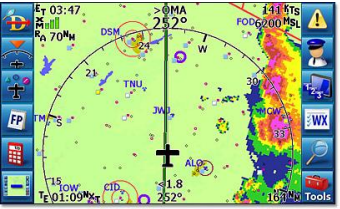
The ATC offers all the navigation and other features you’d expect from a GPS, like flight and route planning, terrain mapping, optional obstacle clearance, basic on-screen flight instrumentation, E6B functions and more. There are a series of menu buttons that occupy the sides of the screen, and you can easily make these disappear or re-appear with a single touch. This maximizes the viewable area and is very handy in use.
The ATC also allows you to tap on an airport shown on the screen and get information about the airport. This includes a diagram of the runways (and taxiways at US airports), COMM frequencies and even fuel prices (if the airport lists them on 100LL.com). You can set the screen to display the various radio frequencies for any airport shown. It also has features like a virtual co-pilot that nags you to switch tanks on user-set intervals.
It’s easy to update the ATC’s software from Anywhere Map’s website. In fact, my ATC got the latest updates on airspace and airports around Calgary within days of them being published. Some of the data, such as the newly registered field at Linden, showed up on the ATC but has yet to be published on a VNC or in the Canadian Flight Supplement.
I’ve never lost the GPS signal on my ATC and it works perfectly even in my house. The touchscreen is easy to use in flight, even in turbulence. I was initially concerned about this aspect of the ATC, but it’s turned out to be no problem.
XM satellite weather is available for the ATC, either at the time of initial purchase, or as a later upgrade. XM is pretty expensive for a poor, grass strip tail-dragger pilot, so I can’t offer any insight into that feature except to say that you can get it.
I also like the dual-purpose nature of the ATC. Its ground navigation software has been around for quite a number of years and has vast experience in numerous palm devices. Admittedly, the aviation software is newer, but I’ve only seen it improve over the year I’ve owned mine. And it was pretty darn good to start with.
Ground-based NAV system is a completely different software suite that is highly detailed and offers all the features normally found in such systems. It was incredibly handy last summer when Wade Miller and I flew to Seattle. We’d get on the ground, and with a few touches on the ATC, switch to ground mode for driving around the cities where we stayed. The driving mode software, also updated when you connect the unit to the website, offers all sorts of information on restaurants, accommodations and other facilities. It worked very well in Hawaii last year, too. And of course, it simply slipped into my pocket whenever I didn’t need it.
The company offers excellent support and regular updates which really inspires my confidence in the ATC and Anywhere Map itself. I thoroughly enjoy my ATC and I plan to keep it for a good long time. The company’s website is at http://www.anywheremap.com. I recommend perusing the comparison page to see how the ATC rates against the competition. I think you’ll be impressed.
See http://www.anywheremap.com/ for more details.
 Calgary Recreational Flying Club YYC